Microsoft 365 · Cybersecurity · Artificial Intelligence
The $50,000 Email: AI Is Making Invoice Fraud Harder to Spot
By Tom Daugherty · September 15, 2026
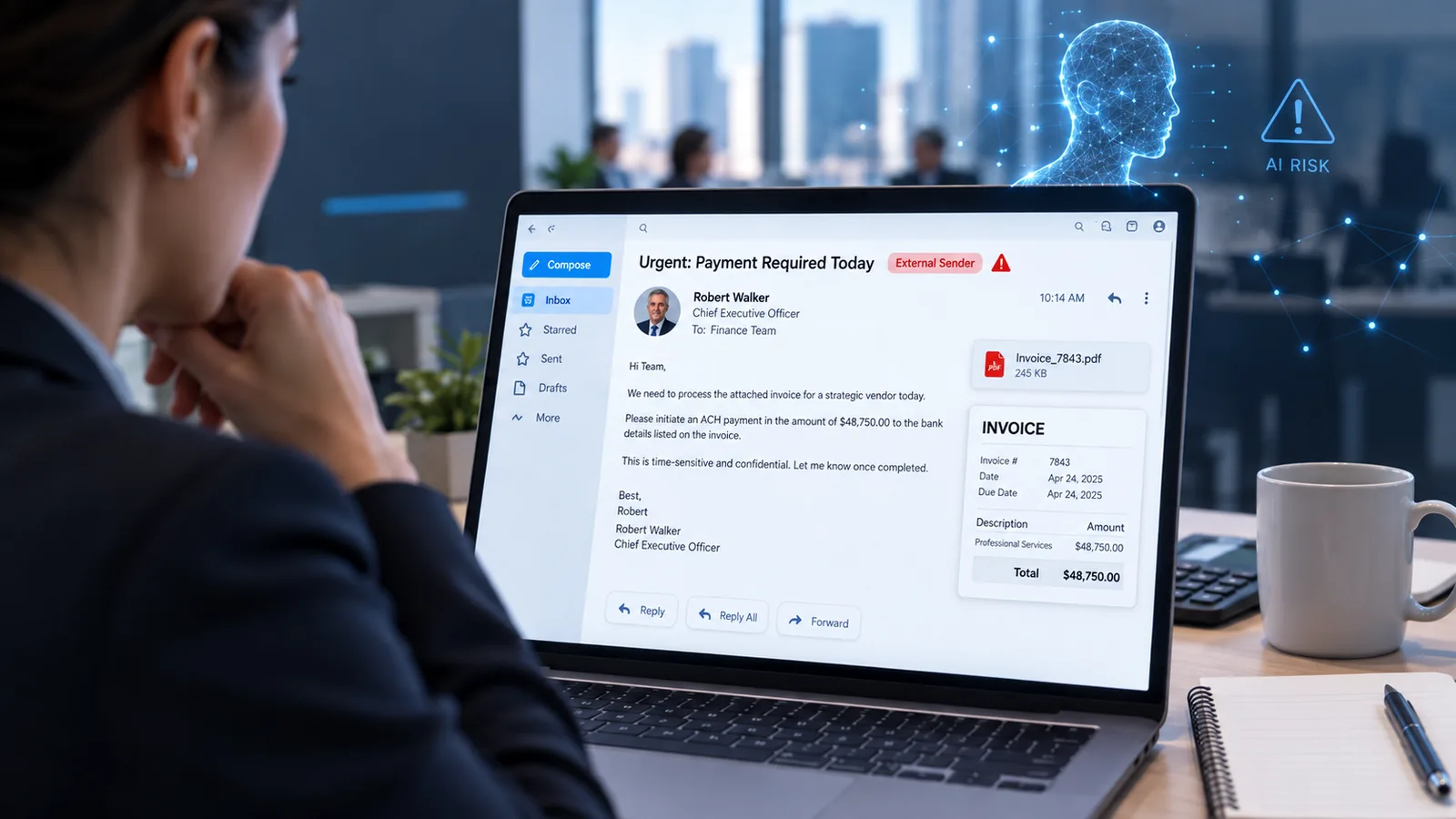
An email arrives in accounting.
It appears to come from the CEO. There’s an approved invoice, a previous email conversation with the vendor, professional branding, payment instructions, and enough company-specific information to make the whole thing look legitimate.
The problem is that none of it is real.
Microsoft recently disclosed a large-scale financial fraud campaign that sent more than one million scam emails in just three days. Nearly 88% of the messages targeted users in the United States, and attackers attempted to convince accounting departments to make ACH payments of nearly $50,000.
The emails impersonated company executives, included fabricated invoices and even contained fake forwarded conversations with a well-known vendor.
Microsoft said it observed “several indicators consistent with AI-assisted template development” which were used to help develop and customize the campaign.
This is where business email fraud is heading.
This Wasn't the Typical Bad Phishing Email
Most of us have learned to recognize the obvious signs of phishing.
Bad grammar. Strange formatting. A suspicious attachment. An email that clearly doesn't sound like the person who supposedly sent it.
AI is making those clues less reliable.
In the campaign Microsoft investigated, attackers combined several techniques at once. They impersonated executives such as CEOs and CFOs, created lookalike domains, built realistic invoices, used legitimate third-party email delivery infrastructure and fabricated entire email conversations to support the payment request.
They even personalized portions of the invoice with information about the organization being targeted.
The attack didn't need ransomware or some exotic zero-day vulnerability.
It needed someone in accounting to believe the message.
Why This Matters to Smaller Businesses Too
It would be easy to read about a million-email cyberattack and assume this is an enterprise problem.
But the underlying attack is remarkably simple: impersonate someone with authority, create a believable reason for a payment, and pressure another employee to send the money.
That process works whether a company has 10 employees or 10,000.
Smaller organizations can actually have an operational disadvantage. A person responsible for accounts payable may also handle HR, purchasing and several other responsibilities. There may not be a dedicated security team watching suspicious activity, and employees often know executives personally enough that an informal payment request doesn't immediately seem unusual.
That's why cybersecurity can't depend entirely on an employee spotting the scam.
Email Security Has to Work in Layers
There isn't one setting that makes this problem disappear.
Microsoft recommends several layers of protection against executive impersonation and invoice fraud, including properly configured email authentication, spoof protection, Microsoft Defender for Office 365, mail-flow controls and post-delivery remediation such as Zero-hour Auto Purge.
SPF, DKIM and DMARC should also be configured correctly so receiving systems have better information about which servers are actually authorized to send mail for your domain.
Those technical protections should be paired with identity security.
Multifactor authentication should be enforced, legacy authentication should be disabled, privileged accounts should receive additional protection, and businesses should increasingly consider phishing-resistant authentication such as passkeys and hardware security keys for sensitive accounts.
But technical controls aren't the whole answer.
Your Payment Process Is Part of Your Cybersecurity
One of the best defenses against invoice fraud doesn't require any software at all.
Create a second method of verification for unusual financial transactions.
If an executive suddenly requests a $20,000 ACH payment, don't verify the request by replying to the same email.
Call them.
Send them a Teams message using an existing conversation.
Confirm the vendor using contact information already stored in your accounting system rather than a phone number contained in the new invoice.
For larger transactions, consider requiring approval from two people.
This may add a few minutes to a payment. It can also stop an attacker who has spent days building the perfect fake email.
Microsoft 365 Can Do More Than Most Businesses Realize
One of the things we frequently see is that businesses already own many of the security capabilities they need.
They just aren't configured.
Microsoft 365 environments grow organically. Accounts get added. Administrators change. Security defaults get modified. Exceptions accumulate. Old authentication methods remain enabled. Email authentication records were configured years ago and haven't been reviewed since.
Having Microsoft 365 does not automatically mean that Microsoft 365 is securely configured.
That's an important distinction.
A well-configured environment can use multiple signals to identify suspicious email, detect impersonation, quarantine malicious messages, protect identities and provide administrators with much better visibility when something unusual happens.
Microsoft's own guidance for this recent campaign specifically emphasizes layered email protection rather than relying on users to recognize every fraudulent message.
Find the Gaps Before Someone Else Does
At Cracked Cloud, we help businesses understand what they're actually getting from their Microsoft 365 environment and where their security gaps are.
We're currently offering a free Microsoft 365 Security Assessment that reviews hundreds of settings and controls across your tenant.
We'll identify security weaknesses, explain what they mean in plain English, and help prioritize what should actually be fixed.
There is no requirement to replace your existing IT provider, either. If you already have someone managing your technology, consider it a second opinion.
Because the email that costs your business $50,000 probably isn't going to say:
WARNING: THIS IS A PHISHING EMAIL.
It's going to look like business as usual.
Want to know how your Microsoft 365 environment would hold up?