Small Business Technology · IT Support · Cybersecurity
What Are Managed IT Services, and Does Your Small Business Need Them?
By Tom Daugherty · July 27, 2026

Technology has a habit of becoming most noticeable when it stops working.
An employee cannot sign in. Email is behaving strangely. A laptop is painfully slow. A software update breaks something important. A shared file disappears. The backup may be running, but nobody is completely sure it could restore the business after a real emergency.
For many small businesses, these problems are handled one at a time by whoever happens to know the most about computers. That can work for a while. It becomes much harder as the business adds employees, devices, cloud services, customer data, and security requirements.
Managed IT services provide a more dependable approach. Instead of waiting for something to break and then looking for help, a managed service provider takes ongoing responsibility for agreed parts of your technology.
What are managed IT services?
- Employee computers and mobile devices
- Microsoft 365, Google Workspace, email, and shared files
- User accounts, permissions, and multi-factor authentication
- Software updates and routine maintenance
- Endpoint protection and security monitoring
- Data backups and recovery planning
- Office networks, Wi-Fi, firewalls, and internet connections
- New employee setup and departing employee access removal
- Vendor coordination when an internet, software, or hardware provider is involved
- Technology planning, budgeting, and project guidance
The important difference is not simply the number of services. It is the shift from occasional repair work to continuous responsibility.
How managed IT support works
A good managed IT relationship usually begins with discovery. The provider learns how the business operates, what technology it relies on, where employees need help, and which risks need attention.
That initial review may include computers, accounts, applications, network equipment, backups, security settings, vendors, and existing documentation. Immediate issues are prioritized, but the provider should also create a practical plan for improving the environment over time.
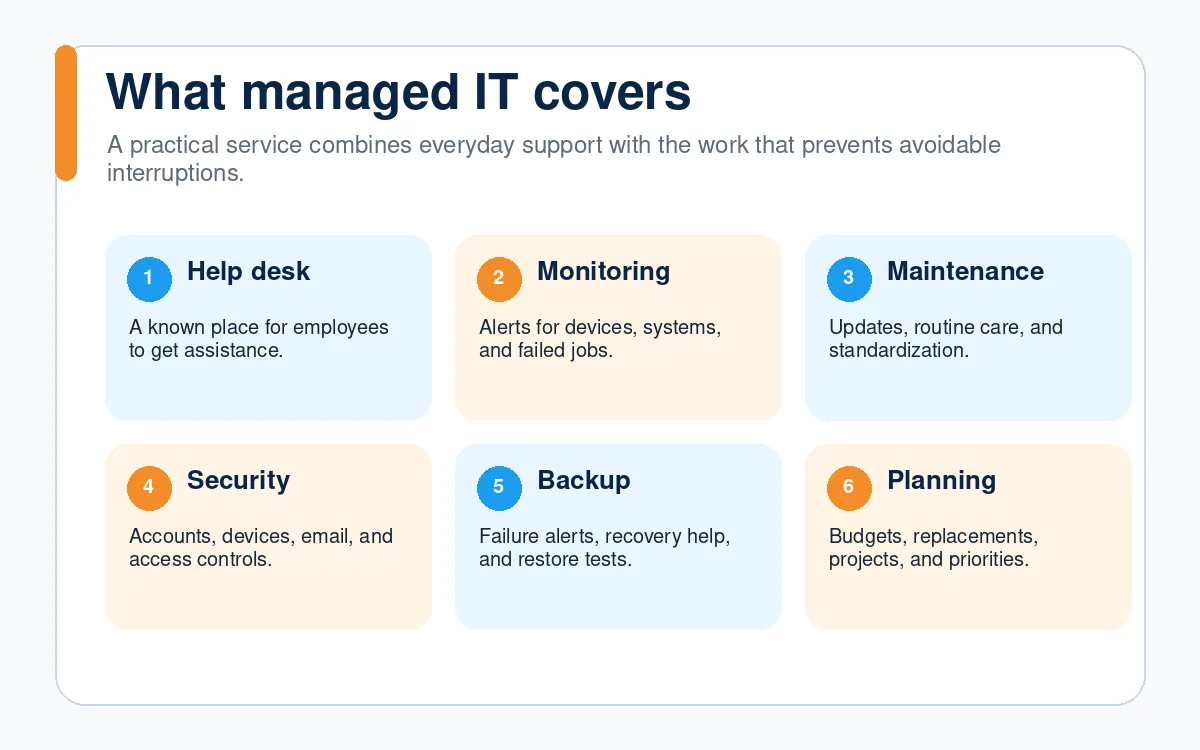
After onboarding, the relationship typically includes several layers of support.
Day-to-day help
Employees have a known place to ask for assistance. Requests are tracked instead of being buried in personal texts, hallway conversations, or an owner’s inbox. Common problems can be resolved faster because the provider already understands the environment.
Proactive maintenance
Devices, software, and security tools are maintained on a schedule. Monitoring can identify issues such as a failed backup, a low-storage warning, an offline device, or a missing update before the problem turns into significant downtime.
Security and access management
The provider helps standardize important protections such as multi-factor authentication, endpoint security, device encryption, account permissions, email authentication, and employee onboarding and offboarding.
Backup and recovery planning
Having a backup is not the same as knowing the business can recover. Managed IT should define what is being protected, how often it is backed up, who receives failure alerts, and how restoration will be tested.
Technology planning
Small businesses regularly face technology decisions: replace aging computers, move files to the cloud, improve remote access, change phone systems, automate a manual process, or prepare for growth. A managed provider can help compare the options and build a reasonable plan before money is spent.
Managed IT is more than a help desk
Help desk support is important, but it is only one part of the job.
If an employee repeatedly loses access to an application, simply resetting the password each time is reactive support. A managed approach also asks why the problem keeps happening. Is the account configured incorrectly? Is an old sign-in method still enabled? Is there a better onboarding process? Is the application itself the wrong fit?
The provider should resolve the immediate issue and look for the pattern behind it.
That same thinking applies to slow computers, unreliable Wi-Fi, missed software updates, recurring printer problems, backup warnings, and confusing permissions. The objective is not to create more tickets. It is to reduce preventable interruptions.
Does every small business need managed IT?
Not necessarily.
A very small business with one or two people, simple cloud applications, little sensitive data, and strong technical knowledge may be comfortable handling most of its own technology. Occasional project support or hourly assistance may be enough.
Managed IT becomes more valuable when:
- Employees regularly lose productive time to technology problems
- The owner or another employee has become the unofficial IT person
- The business stores customer, financial, health, legal, or employee information
- Nobody is clearly responsible for updates, backups, or security alerts
- New employees take too long to get the access and equipment they need
- Departing employees are not removed consistently from every system
- The business depends on technology to serve customers or collect revenue
- Growth is adding more devices, accounts, locations, or cloud services
- The business wants predictable support instead of emergency-only expenses
The right question is not simply, “How many employees do we have?” A five-person firm with sensitive client data and several critical applications may need more structure than a twenty-person company with a very simple environment.
What should you expect from a managed IT provider?
Before choosing a provider, ask what the monthly service actually includes. Similar-sounding plans can assign responsibility very differently.
- Look for clear answers to questions such as:
- How do employees request support?
- What are the normal support hours and escalation options?
- Which devices, users, locations, and cloud services are covered?
- Are security tools included or billed separately?
- Who monitors backup failures, and are restores tested?
- How are onboarding and offboarding handled?
- What work is considered a separate project?
- Who owns the documentation and administrative accounts?
- What happens if the relationship ends?
- How will the provider help plan future improvements?
A trustworthy provider should be able to explain the service in plain language. You should know who owns each responsibility, what is included, and what still belongs to your business.
Why local support can still matter in a cloud-first world
Many technology issues can be resolved remotely, which is faster and often less disruptive. Local support still matters when a business needs help with office networking, equipment replacement, a move, a new location, or an issue that cannot be solved from a distance.
For businesses in Palm Bay, Melbourne, and the surrounding Space Coast, a local provider can combine responsive remote support with on-site assistance when it is genuinely needed.
That local context also matters for continuity planning. Internet outages, power interruptions, and severe weather are not abstract risks in Florida. A practical IT plan should account for how employees communicate, access files, and continue serving customers when the normal workplace is unavailable.
The goal is simpler, more reliable technology
Managed IT should not bury a small business in enterprise jargon or unnecessary tools. It should make technology easier to understand and more dependable to use.
At Cracked Cloud, we help small businesses improve day-to-day support, security, cloud systems, backups, and business workflows. The approach begins with understanding how your business works and identifying the problems worth solving first.
If your team is spending too much time fighting technology, or nobody is confident about who is responsible for keeping it secure and reliable, schedule a free consultation. We can talk through your current setup and help determine whether managed services, a focused project, or occasional support makes the most sense.
Frequently asked questions
Is managed IT the same as outsourcing all of our technology?
No. Some businesses outsource nearly everything, while others keep an internal technical employee and use a provider for monitoring, security, escalation, or specialized projects. The responsibilities should be defined around the business’s actual needs.
Can a managed IT provider support a very small business?
Yes, although the service must be appropriately sized. A small firm may need reliable support, security, backup oversight, and account management without needing a large-enterprise toolset.
Are projects included in managed IT?
It depends on the agreement. Routine support and maintenance are commonly included, while major migrations, office moves, new system deployments, and large remediation efforts may be quoted separately. Ask for clear examples before signing.
Will managed IT eliminate every technology problem?
No provider can prevent every outage, hardware failure, vendor issue, or cyberattack. Managed IT should reduce preventable problems, improve response, and make recovery more organized when something does happen.